
FerryFriend
True Course LLCTravel & Local
4.711.00 Reviews
- Version
- 5.6.1
- Installs
- 10.00K
- Age Rating
- Everyone
Screenshots
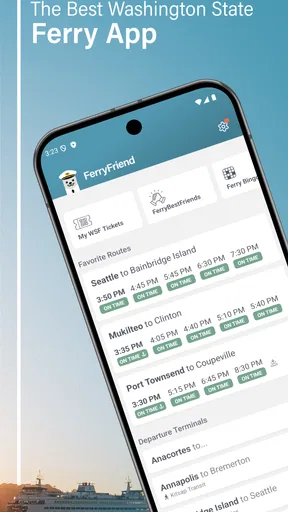
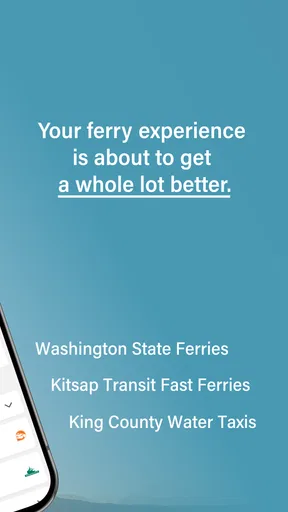
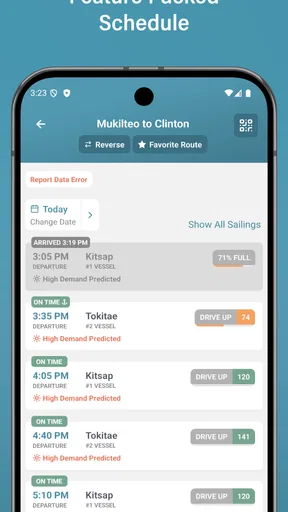
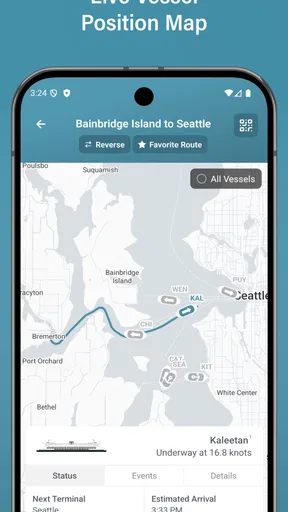
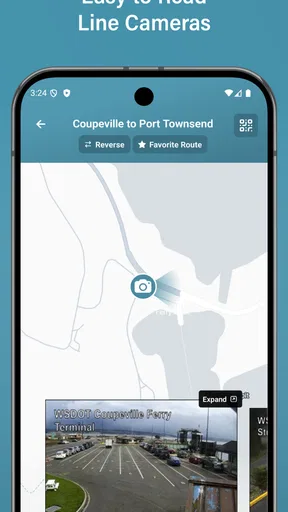
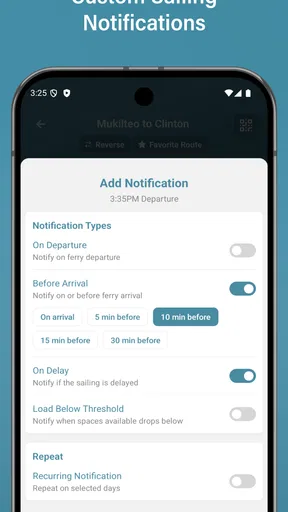
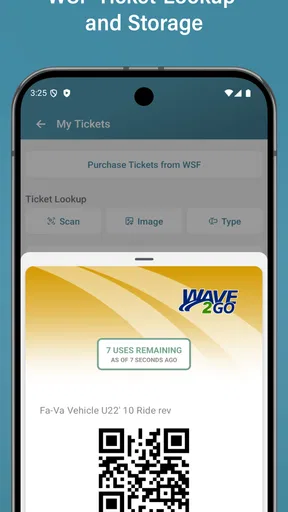
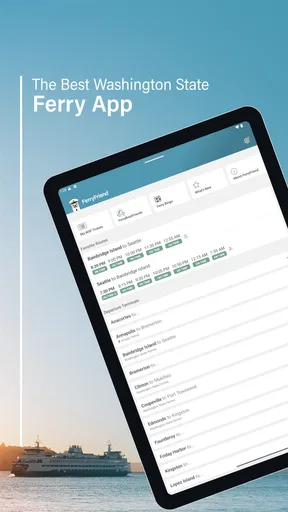
Our Review of FerryFriend
 Analysis by Appyee
When I need to cross Puget Sound, the difficult part is rarely the ferry ride itself. It is figuring out which sailing actually fits the rest of my day, especially when a small delay or a missed departure can change the whole plan. FerryFriend is built around that very specific problem: keeping Washington ferry schedules close at hand in a simple travel and local app.
After using it, my impression is that its value comes from focus rather than from trying to become a complete trip planner. It is not the kind of app I would open to organize hotels, compare flights, or build a sightseeing itinerary. I would open it when the ferry is the important connection and I want a quicker way to check the timetable than repeatedly searching through a general website or a broad transit app.
That narrow purpose makes the app easy to understand. It is free to install, suitable for Everyone, and developed by True Course LLC. Its current version is 5.6.1, and it runs on Android 7.0 or later. The app has reached over 10 thousand installs, with a 4.7 average from around 33 ratings and 11 written reviews. Those numbers suggest a small but positive user base, which feels consistent with an app aimed at a particular regional travel need rather than a worldwide audience.
Why the schedule-focused approach matters
The central capability is straightforward: FerryFriend puts Washington ferry schedules at the center of the experience. That sounds modest, but it solves a real point of friction. A ferry timetable is not useful in isolation; I need to know what is leaving from the route I care about, what time I should arrive, and whether the sailing works with a meeting, appointment, school pickup, or connection on the other side.
With a general maps app, I usually have to enter a destination first and then interpret a mixture of driving directions, walking time, transit options, and departure information. That can be helpful for a complete journey, but it also creates extra steps when I already know that the ferry is the key decision. FerryFriend feels more direct because it treats the sailing schedule as the starting point instead of burying it inside a larger route calculation.
The difference is most noticeable when I am making a quick decision. If I am standing near a terminal, planning a return trip, or deciding whether to leave home now or later, I do not necessarily want a long list of alternate routes. I want to check the schedule and make a practical choice. A focused app can be better than a more powerful one when the question is narrow and time matters.
There is also a useful mental shift here. I am not asking the app to tell me everything about Washington travel. I am using it as a timetable reference that helps me make the next decision. That distinction keeps expectations realistic and is one reason I found the app easier to judge than a full-featured travel platform.
Checking a sailing without turning it into a research task
In everyday use, the best workflow is to open FerryFriend before I leave, identify the relevant ferry schedule, and use that information to plan the surrounding trip. I prefer doing this while I still have time to adjust. If I am driving to a terminal, for example, I can compare the sailing time with the time I expect to arrive instead of discovering at the last moment that the next departure is much later.
That simple habit is more important than it sounds. Ferry travel often requires coordination between several moving parts: the trip to the terminal, the wait before boarding, the crossing, and the journey after arrival. A schedule app cannot remove those variables, but it can give the whole plan a clear anchor. I find that especially useful when I am traveling with someone who does not want to spend the journey searching through several pages of information.
My practical tip is to check the return sailing at the same time as the outbound one. Many people focus on getting to an island or waterfront destination and leave the return decision until later. FerryFriend is more useful when I treat it as a round-trip planning tool, even if I only need one departure immediately. Knowing the return options early can affect how long I stay, where I park, and whether a day trip is comfortable or rushed.
Another good workflow is to use the app before opening a navigation app. First I check the ferry schedule and choose a realistic sailing. Then I use maps for the road, walking, or local transit portion. This division of labor is more efficient than asking one app to handle every part of the journey. FerryFriend provides the schedule-focused view, while a navigation tool remains better for turn-by-turn directions and broader route planning.
A realistic morning with a ferry connection
Imagine I have an appointment on the other side of the water and need to take a ferry in the morning. I would check the schedule at home, select a departure that leaves enough room for the drive to the terminal, and then look at the return options before committing to the appointment time. If the return schedule makes the plan too tight, I can change the appointment or leave more time rather than discovering the problem after arriving.
On the day itself, I would check again before setting out. That second check is useful because a timetable is part of a live travel plan, not a promise that every surrounding condition will be perfect. I would still allow extra time for traffic, terminal procedures, and the possibility that the most convenient sailing may not be the one I catch. The app helps me choose; it does not remove the need for judgment.
For a family, this can reduce unnecessary discussion in the car. One person can check the sailing while another handles navigation, and everyone has a clearer idea of the target departure. For a commuter, the same process can become a quick morning routine. For a visitor, it can provide a more direct starting point than trying to understand the entire regional transportation network at once.
The subtle benefit is that the app encourages planning around actual departures rather than vague arrival estimates. That is a better fit for ferry travel, where missing a sailing can have a much larger effect than taking a wrong turn on an ordinary city journey.
Where it fits beside maps and official information
I would not treat FerryFriend as a replacement for every other travel resource. A maps app is usually stronger when I need a complete route from my current location, live driving guidance, walking directions, or several transportation modes in one view. If I am visiting an unfamiliar city and the ferry is only one small part of a complicated itinerary, a broader travel tool may be more convenient.
On the other hand, a general map can make a ferry schedule feel like just another result among many. FerryFriend is more appealing when the schedule itself is the main thing I need. It reduces the amount of unrelated information competing for attention, which is valuable when I am checking a departure quickly or comparing the outbound and return portions of a trip.
I would also keep an official ferry information source available for situations where the latest operational detail matters. A schedule reference is excellent for planning, but travelers should use their judgment when conditions are changing or when a trip is unusually important. The app is best understood as a convenient schedule companion, not as permission to ignore terminal instructions or other travel updates.
This is one of the main trade-offs: focus makes the app quicker to understand, but focus also means it is not a universal travel dashboard. I see that as a reasonable design choice, provided I use it for the job it is meant to do.
Small habits that make the app more useful
The first habit is to check both directions before leaving. The second is to build a buffer around the chosen sailing instead of treating the departure time as the exact moment I should reach the terminal. The third is to use FerryFriend for the ferry decision and another tool for the road or walking route. Together, these habits turn a simple timetable app into a more dependable part of a travel routine.
I also recommend checking the schedule before making reservations on the destination side. A restaurant booking, event, or appointment may look convenient until the ferry times are considered. Planning the ferry first can prevent an itinerary that technically works but leaves no flexibility. This is a particularly important trade-off for visitors who are unfamiliar with how much time a water crossing can add to a day.
For repeat travelers, the app can serve as a quick reference before leaving work or home. I would not need to rebuild the entire trip each time. I could simply check the sailing, confirm the return plan, and then move to navigation. That repeated workflow is where a focused app earns its place on a phone: not through a long list of features, but by reducing a recurring task to a few deliberate steps.
Limitations I would consider before installing
The biggest limitation is the app’s regional focus. If I rarely travel on Washington ferries, I would not expect to use it often enough to justify making it part of my regular travel setup. Someone planning trips across several states or countries will probably gain more from a broader transit or maps app.
It is also not the right choice for someone who wants a complete itinerary manager. I would look elsewhere if I needed hotel bookings, attraction planning, detailed walking routes, or a single screen combining flights, buses, trains, and ferries. FerryFriend’s strength is the schedule-centered task, and that strength naturally comes with a narrower scope.
Another limitation is that a schedule alone cannot answer every practical question. It does not replace preparation for the journey to the terminal, and it cannot make a tight connection comfortable. I still need to account for traffic, parking, walking distance, and the time required to board. The app gives me a useful reference point, but the quality of my plan depends on what I do with that information.
The app is free, which makes trying it low risk, although in-app purchases range from $2.99 to $599.99 per item. I would pay attention to any purchase screen and avoid assuming that every part of the experience is included simply because the initial download costs nothing. That is not a reason for me to dismiss the app, but it is a sensible point to keep in mind before committing to optional purchases.
Finally, the modest size of the rating base means I would judge the app by my own route and routine rather than treating the average rating as a guarantee. A 4.7 average is encouraging, but a regional schedule tool can feel excellent for one traveler and unnecessary for another. The important question is whether Washington ferry information is a frequent enough need in my own life.
Who is likely to gain the most from it
FerryFriend is most useful for people who regularly cross Washington waters, plan day trips involving a ferry, or need a quick schedule check without navigating a larger travel service. It should also appeal to travelers who prefer separating planning tasks: one app for ferry departures, another for driving directions, and perhaps a separate source for destination details.
I can see it being especially helpful for occasional visitors who know the destination but are less familiar with ferry timing. Instead of starting with a complicated regional transportation search, they can begin with the departure schedule and build the rest of the trip around it. That makes the app approachable without pretending that it handles every part of the visit.
It may also suit households where one person usually organizes transportation. A quick schedule check can make it easier to communicate a departure plan to everyone else. The benefit is not just convenience on the phone; it is reducing uncertainty before the day becomes busy.
People who should skip it are those who do not use Washington ferries, those who need live navigation more than timetables, and those who want a full travel-planning suite. For them, installing a specialized app may add another step rather than remove one. I would also skip relying on it alone for a high-stakes connection where broader operational information and extra confirmation are essential.
My recommendation after using the schedule-first approach
I like FerryFriend because it understands that a ferry schedule is sometimes the whole reason I am opening a travel app. Its focused design makes sense for quick planning, return-trip checks, and building a realistic day around a specific sailing. I would recommend it to a friend who travels on Washington ferries and wants a dedicated reference instead of searching through a general-purpose app every time.
I would describe it as a practical companion rather than a complete transportation solution. Its best use is to choose and organize the ferry portion of a journey, then let maps and other resources handle the pieces around it. When I use that division clearly, the app feels more useful and less frustrating.
For me, the deciding factor is frequency. If Washington ferry schedules are part of your normal travel life, the free download is easy to justify, and the app’s 4.7 average gives it a reassuring first impression. If ferry travel is rare or your trips involve many different transportation systems, a broader alternative will probably serve you better. FerryFriend is at its best when one focused question matters: which Washington ferry fits my plan?
Verdict
Strengths of FerryFriend
- Shows ferry routes, schedules, and fares in one convenient place.
- Useful for comparing travel options before booking a crossing.
- Clear sailing details help with planning departure and arrival times.
- Can make ferry travel easier for occasional passengers and tourists.
- Helpful trip information reduces the need to check multiple websites.
Limitations of FerryFriend
- Schedule and fare data may vary by ferry operator or region.
- Some routes may have limited availability or incomplete information.
- Booking features can depend on the selected ferry company.
- Internet access may be needed to view current travel updates.
- Prices and schedules can change after checking the app.
Similar Picks in This Category
View All
Google Maps
Google LLC3.4

Google Maps Go
Google LLC4.1

Booking.com: Hotels & Travel
Booking.com Hotels & Vacation Rentals4.8

Google Earth
Google LLC3.8

Skyscanner Flights Hotels Cars
Skyscanner Ltd4.8

trivago: Compare hotel prices
trivago N.V.4.4
Frequently Asked Questions
What is FerryFriend, and what can I use it for?
FerryFriend is a travel-focused app designed to help users find and manage ferry journeys more conveniently. Depending on the routes and operators supported in your region, it may provide sailing information, schedules, route details, booking-related tools, and trip planning features. Before downloading, check whether your preferred ferry company and destinations are covered, since availability can vary by country and service provider.
Can I book ferry tickets directly through FerryFriend?
FerryFriend may support booking or redirect users to an operator or ticketing partner, but the exact process depends on the selected route and ferry company. Some journeys may only display schedules and travel information, while others can offer online reservations. Always review the final price, passenger details, vehicle requirements, cancellation rules, and payment conditions before confirming a booking.
Does FerryFriend provide live ferry updates and cancellations?
The app can be useful for checking ferry schedules and receiving travel information, but the availability and accuracy of live updates may depend on the operator and the data supplied to FerryFriend. Weather, technical problems, port restrictions, and seasonal changes can affect departures. For an important journey, compare the app’s information with official announcements from the ferry company or port.
Is FerryFriend free to download and use?
FerryFriend may be available as a free download, although some services can involve additional costs. These may include ticket purchases, booking fees, premium features, or charges applied by a ferry operator or external payment provider. Installing the app does not necessarily mean that your trip is free, so check the store listing and the checkout screen carefully before completing any transaction.
What information or permissions does FerryFriend require?
The permissions required by FerryFriend can vary according to the features enabled on your device. Location access may be useful for finding nearby ports or improving travel guidance, while notifications can provide schedule reminders or service updates. You should review the app’s privacy policy and permission requests before granting access, and disable permissions that are not necessary for the features you intend to use.
